
NPS Mobile1.2.0 - Get APK
You'll be able to download in few seconds.
Publisher Description
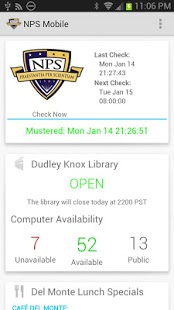
Have a feature that you'd like to see? Want to help with development? The source code is now available on GitHub. Contact the developer if you want to be a contributor!!
App Features:
- Daily Muster Verification (See "How It Works" section below)
- Schedulable Muster reminder that only notifies you if you haven't mustered for the day (weekends and holidays are automatically skipped!)
- Daily Club Del Monte Lunch Specials Menu
- Real-time Library status
- Campus Map with pan and zoom
- Academic Calendar
- Upcoming Events (NPS and MWR)
- NPS News Headlines
* Having a hard time remembering to muster by 1000? Schedule a daily confirmation check! Unlike traditional alarms, the Muster Reminder feature will only alert you if you have not mustered. If you've mustered for the day, it leaves you alone. And, it's already programmed to skip weekends and holidays (including official 72's and 96's).
How It Works:
- Muster is verified one of two ways: if your device is connected to the NPS wifi network, the app goes to the student check-in page and checks for a successful confirmation message; if not on the NPS wifi network, the app checks your email folders for your muster confirmation email (changing the app setting to check a specific email folder makes this process much faster!).
- When you schedule a recurring muster verification, the app is programmed to automatically skip weekends and published holidays, so you won't be bothered on your day off.
- Enabling the Snooze feature means that you will continue to receive reminder notifications at interval of your choice until the app detects that you have successfully mustered.
- Lunch specials are checked daily M-F, and are available as soon as the Cafe Del Monte staff posts the day's menu (usually around 0800, but NLT 0900). Refresh the Lunch card by tapping the icon in the top left corner.
- Events are retrieved from both the NPS website and the MWR website and ordered chronologically. The two next upcoming events from each category are displayed on the Events card.
*** FEEDBACK AND SUGGESTIONS ARE APPRECIATED ***
Disclaimers:
- This is a privately developed application, and is not endorsed by the Naval Postgraduate School, the U.S. Navy, or anyone else.
- This application does NOT muster for you, and assumes no liability for your failure to do so.
- This is beta software, and as such, may not work as expected for all installations. Help to improve it by reporting any bugs or errors. Your input is greatly appreciated.
- Any suggestions or feature requests should be sent to the developer email (NOT the SSO or ITACS).
- Certain features require network access to work.
This application was written for NPS students by a fellow NPS student.
About NPS Mobile
The company that develops NPS Mobile is Pepin. The latest version released by its developer is 1.2.0.
To install NPS Mobile on your Android device, just click the green Continue To App button above to start the installation process. The app is listed on our website since 2015-03-14 and was downloaded 0 times. We have already checked if the download link is safe, however for your own protection we recommend that you scan the downloaded app with your antivirus. Your antivirus may detect the NPS Mobile as malware as malware if the download link to com.pepinonline.mc is broken.
How to install NPS Mobile on your Android device:
- Click on the Continue To App button on our website. This will redirect you to Google Play.
- Once the NPS Mobile is shown in the Google Play listing of your Android device, you can start its download and installation. Tap on the Install button located below the search bar and to the right of the app icon.
- A pop-up window with the permissions required by NPS Mobile will be shown. Click on Accept to continue the process.
- NPS Mobile will be downloaded onto your device, displaying a progress. Once the download completes, the installation will start and you'll get a notification after the installation is finished.
Program Details
System requirements
Download information
Pricing
Version History
version 1.2.0
posted on 2015-03-14
v1.2.0,- Updated academic calendar through Jan 2016,- Items in News and Events cards are now clickable!,* Email npsmobile@pepinonline.com if you experience any problems, have any suggestions, or have any other feedback/input.
version 1.0.1
posted on 2013-01-16
Several fixes and updates
Disclaimer
External Download
We do not host NPS Mobile on our servers. We did not scan it for viruses, adware, spyware or other type of malware. This app is hosted by Galad and passed their terms and conditions to be listed there. We recommend caution when installing it.
The APK Download link for NPS Mobile is provided to you by apps112.com without any warranties, representations or guarantees of any kind, so access it at your own risk.
If you have questions regarding this particular app contact the publisher directly. For questions about the functionalities of apps112.com contact us.
